the shortlist / reviewed
Monkeytype vs Keybr: choose your test or follow a lesson?
Compare configurable typing tests with adaptive key practice, including a practical way to use both without confusing their scores.
By the Monkeytype Racer team. We publish one of the products discussed. We are independent of Monkeytype, TypeRacer and Nitro Type.
the short answer
Choose Keybr when you want the lesson to focus your attention on individual keys. Choose Monkeytype when you want to choose the text and test format yourself. Use both if you want focused exercises followed by broader practice.
| Decision | Monkeytype | Keybr |
|---|---|---|
| Practice structure | Choose time, words, quote, zen or custom | Generated lessons with key progression described in its help |
| Feedback to focus on | Results within a chosen test format | Current key, active keys, speed and accuracy |
| Text control | Quote lengths and custom mode visible | Lesson text follows the active letter set |
| Other activities | Configurable test interface | Multiplayer and Typing Test entries also visible |
| Best fit | You know the exercise you want | You want guidance on which keys to practice |
Who decides the next exercise?
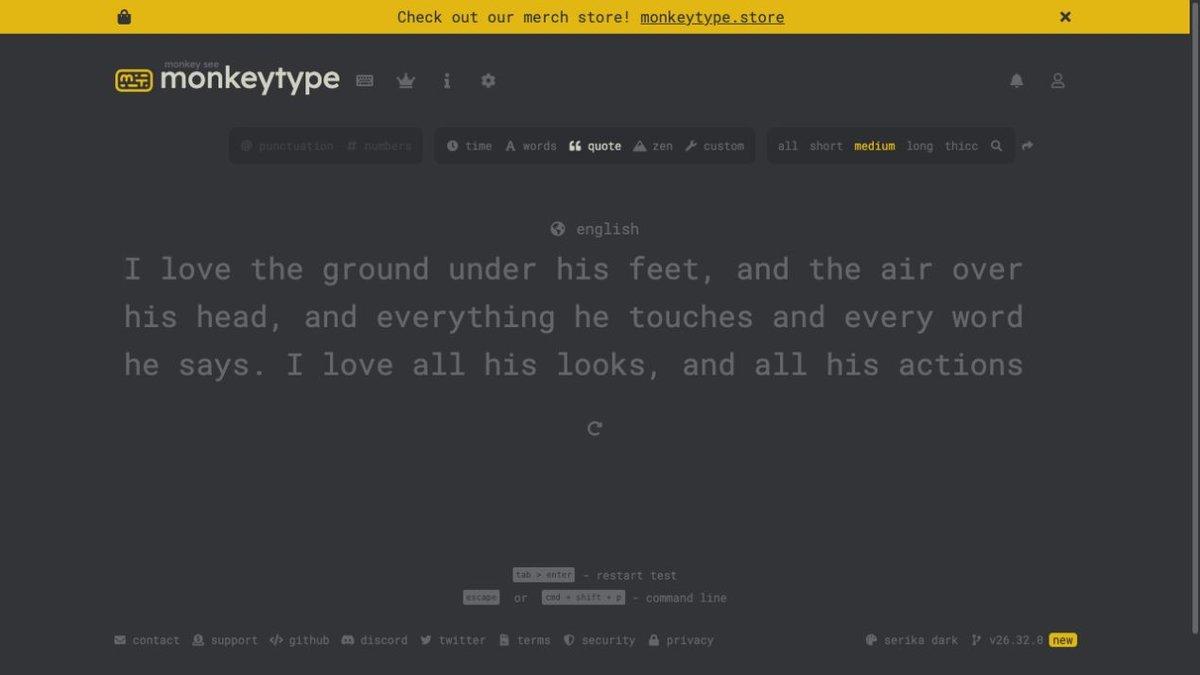
The useful difference is how the next session gets chosen. Monkeytype lets you specify the format: a timed test, a word count, a quote, an open-ended zen session or custom text. That fits someone who already knows what to practice and wants to repeat it under similar conditions.
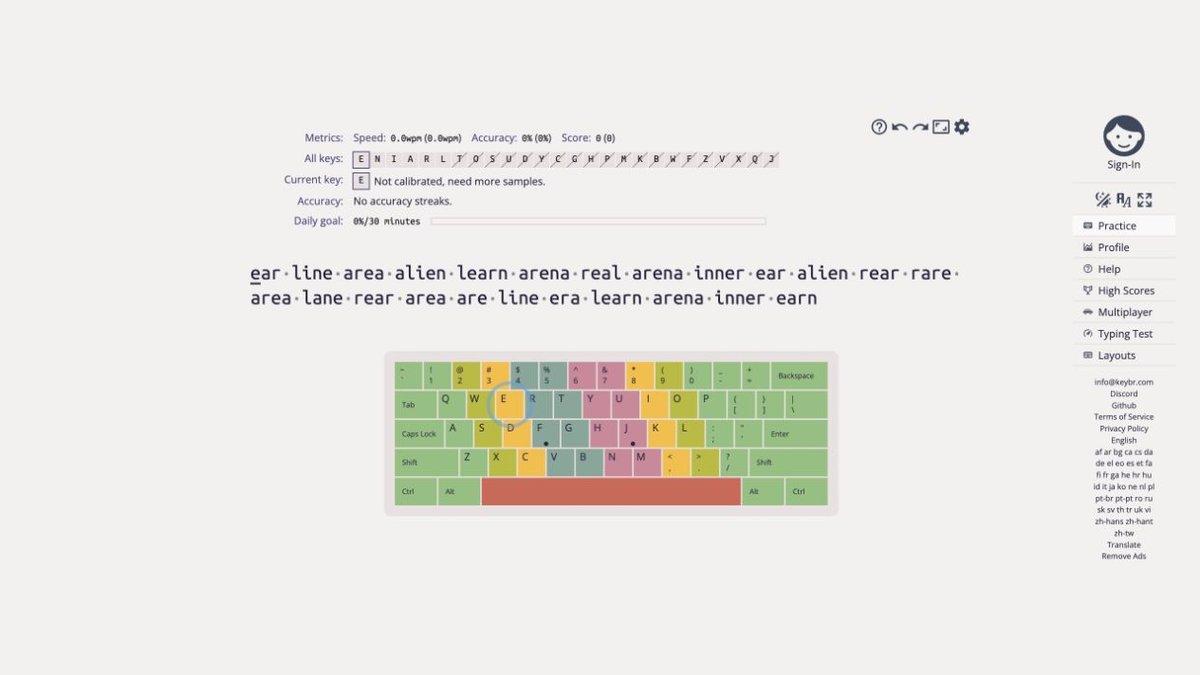
Keybr makes individual keys part of the lesson. Its official help describes generating words from a limited letter set, increasing the frequency of a target key and adding letters as you progress. The practice screen shows that structure directly through the current-key indicator and active or locked letters.
What Keybr’s indicators mean
Our fresh Keybr session showed an uncalibrated current key that needed more samples, alongside speed, accuracy and a daily goal. That is a useful reminder to let an exercise gather evidence before treating a single result as a verdict on your ability.
The help page explains that a target letter appears more frequently and that previously practiced letters can weaken when new ones are introduced. Follow those indicators when choosing what to repeat. We inspected the interface and documentation; we did not complete the full progression or measure a training effect.
Where Monkeytype gives you more direct choice
If you want to practice a particular passage, change duration or switch from familiar words to punctuation-heavy prose, Monkeytype puts test controls beside the text. Its quote mode includes length choices. You do not need to change products simply to move beyond random words.
This choice also means taking responsibility for the exercise. Repeating only your most comfortable settings may yield satisfying scores without addressing a difficult letter or text style. Pick settings based on the task you want to improve, and keep them consistent when tracking progress.
A simple way to use both
Try a short Keybr session focused on its current target, then a Monkeytype quote exercise. Treat the first as focused repetition and the second as an opportunity to use those letters in prose. This is a suggested routine, not a tested prescription or a promise of faster learning.
Keep separate baselines. Keybr’s constrained letter set and a full quote are different tasks, so their WPM numbers need not match. Record accuracy and recurring mistakes as well as speed. Do not move on solely because another site produces a higher number.
Choose by the help you need
Keep Monkeytype if you already have a productive custom practice routine. Try Keybr if you want the software to make individual keys harder to ignore. Its navigation also includes Multiplayer and Typing Test; this comparison focuses on its practice lessons, not a claim that it has no other modes.
Neither product needs to replace the other. Choose one primary place to track progress, and use the second for an exercise your routine is missing.
Sources & review method
We inspected the official product interfaces and selected guest flows on October 12, 2026. Screenshots are from that review. We did not run controlled speed benchmarks, large multiplayer events or long-term learning studies. Features and access requirements can change; verify the relevant flow before organizing an event.
- Monkeytype modes and quote practice ↗
- Keybr practice and key metrics ↗
- Keybr: how lessons and key progression work ↗
For our own product, see room setup and limits, quote practice and how WPM is calculated.
try a session
Try quote practiceKeep comparing.
Monkeytype vs TypeRacer: which should you use?
Choose between configurable solo practice and quote racing, with a fair way to compare your results.
compare the options the shortlist / comparisonsBest typing games to play with friends
Four options for a group session, compared by setup, room controls and what you should check before inviting everyone.
compare the options the shortlist / comparisonsTypeRacer alternatives, matched to what you want next
Keep live racing, add solo control, or choose a game with more progression. Four alternatives with different jobs.
compare the options the shortlist / comparisonsMonkeytype alternatives for different kinds of practice
A reason-based shortlist for key-focused exercises, live competition, group controls and combined practice.
compare the options the shortlist / comparisonsMonkeytype vs Nitro Type: practice tool or racing game?
Compare two different ways to keep typing: configurable solo tests and a game built around racing and progression.
compare the options the shortlist / comparisonsTypeRacer vs Nitro Type: quote races or a continuing game?
Compare TypeRacer’s quote-racing entry points with Nitro Type’s cars and recurring content, including what to check for friends and classrooms.
compare the options the shortlist / comparisonsTypeRacer vs Typer.io: which fits your friend race?
Compare friend-race entry points, private-lobby controls and the setup questions that matter before inviting a group.
compare the options the shortlist / comparisonsKeybr vs TypeRacer: focused lessons or quote competition?
Choose between key-level repetition and race-based practice, with a suggested routine for using each at the right time.
compare the options the shortlist / comparisonsMonkeytype Racer vs TypeRacer: small rooms or familiar tracks?
Compare our guest rooms, shared quotes and nearby solo practice with TypeRacer’s public racing, practice and friend-track entries.
compare the options the shortlist / comparisonsMonkeytype Racer vs Monkeytype: friend races or a solo routine?
Understand how our racing-first product differs from Monkeytype’s configurable test interface, and when keeping both makes sense.
compare the options